
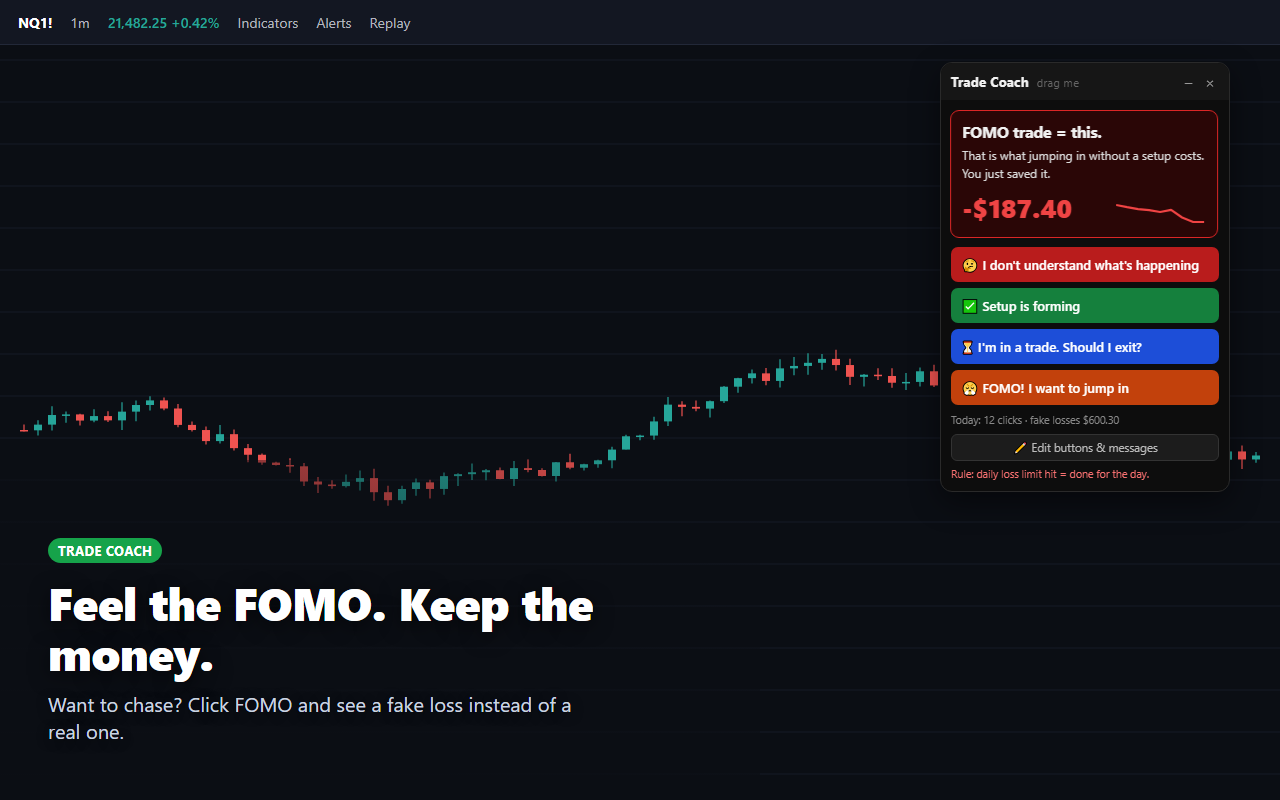
Trade Coach is a free Chrome extension that puts a small coach on top of your charts. When your head says “should I take this?”, you click a button and it answers you. Every time.
⬇ Download Trade Coach (free, 21 KB)
What it does
- 🤔 I don’t understand what’s happening: “Don’t take it now. Not clear = no setup.”
- ✅ Setup is forming: “Take it. Follow the setup.” with a quick checklist: stop loss first, size as per plan, fixed target.
- ⏳ I’m in a trade. Should I exit?: “Sit. Let it hit stop or target.”
- 😤 FOMO! I want to jump in: shows a fake loss in red, so you feel the cost of a chase trade without losing real money.
- No-setup reminders: if no setup forms for a while, a reminder pops up: “There are unlimited opportunities ahead.”
- Make it yours: rename, recolor, add or delete buttons, write your own messages and put your own trading rule at the bottom.
Click as many times as you want. It floats on every site (TradingView, your broker, your prop firm dashboard). Drag it anywhere or shrink it to a small bubble.
How to install (2 minutes)
- Download the zip above and unzip it (right-click → Extract All). Chrome can’t load the zip itself.
- In Chrome, open
chrome://extensions(copy it into the address bar). - Turn on Developer mode (switch at the top right).
- Click Load unpacked and pick the unzipped folder (the one with
manifest.jsoninside). - Click the puzzle icon 🧩 in the toolbar and pin Trade Coach.
- Refresh your chart tab. The coach appears at the top right.
Chrome will say the extension can “read and change data on all websites”. That’s only so the coach can float on any chart site. It doesn’t read anything from your pages and makes no network requests.
Privacy
No account, no tracking. Your buttons, messages and settings stay in your own browser. Full details: Trade Coach privacy policy.
Trade Coach is a discipline tool. It does not give trading signals, and nothing it shows is financial advice. The losses it shows are fake.